
How to Fund Your Prediction Market Account with Crypto (USDC Guide for 2026)
Step-by-step guide to funding prediction market accounts with USDC and crypto. Covers Polygon, bridging, wallets, and the cheapest ways to get started trading events.
You want to trade on whether oil hits $105 this month or which team wins March Madness. You've found the market, you've done the research, and you're ready to put money down. Then you hit the wall: how do I actually get money into this thing?
Prediction markets run on crypto. Specifically, most of them run on USDC — a stablecoin pegged to the US dollar — on the Polygon network. If that sentence made your eyes glaze over, you're exactly who this guide is for.
Let's walk through it step by step, no jargon left unexplained.
Why Prediction Markets Use Crypto (and Why That's Actually Good)
First, the obvious question: why can't you just use a credit card?
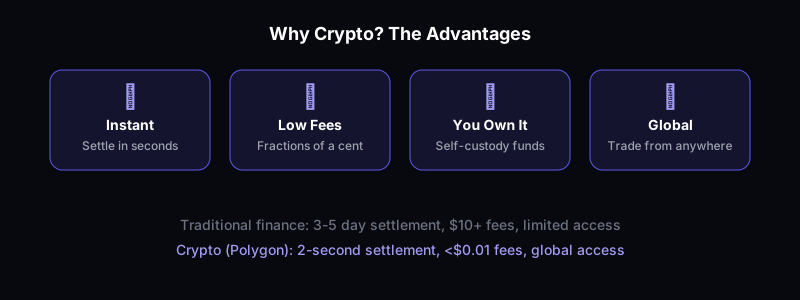
Prediction markets exist in a regulatory gray zone in many countries. Traditional payment processors are cautious about connecting to them. Crypto sidesteps this entirely. USDC on Polygon means instant settlement, low fees, and no bank asking questions about your "gambling" activity.
But there's an upside beyond regulatory convenience: crypto-based prediction markets settle faster, charge lower fees, and give you actual ownership of your funds. Your money isn't locked in some company's bank account — it's in your wallet, and you can withdraw anytime.
The Quick Version (For People Who Know Crypto)
If you've used DeFi before, here's the fast path:
- Get USDC on Polygon (bridge from Ethereum or buy directly on Polygon via any major exchange)
- Connect your wallet to your prediction market platform
- Deposit USDC
- Trade
On Ratio, this takes about 60 seconds if your wallet is already funded. The platform handles the contract interactions — you just approve and go.
Now, for everyone else, let's slow down.
Step 1: Get a Crypto Wallet
A crypto wallet is where your USDC lives. Think of it as a digital bank account that only you control.
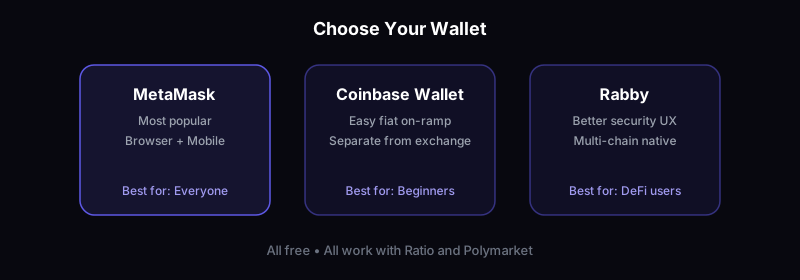
Best options for prediction market trading:
- MetaMask — The most popular browser wallet. Free, works with every prediction market platform, available as a browser extension and mobile app.
- Coinbase Wallet — Not the same as your Coinbase exchange account. It's a separate app that gives you a self-custody wallet.
- Rabby — A newer alternative to MetaMask with better security prompts and multi-chain support.
Install one of these. Write down your recovery phrase (the 12 or 24 words). Store it somewhere safe — not on your phone, not in a screenshot. This is the key to your money.
Step 2: Buy USDC
USDC is a stablecoin. 1 USDC = $1 USD, always. It doesn't fluctuate like Bitcoin or Ethereum. When you have 500 USDC, you have the crypto equivalent of $500.
Easiest ways to buy USDC:
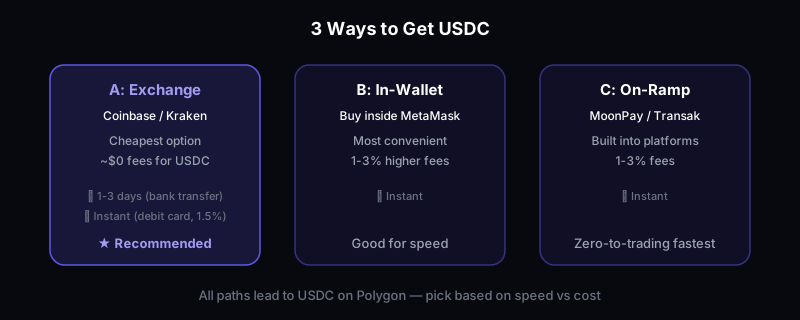
Option A: Centralized Exchange (Simplest)
- Create an account on Coinbase, Kraken, or Binance
- Complete identity verification (takes 10 minutes to a few hours)
- Deposit USD via bank transfer or debit card
- Buy USDC
- Withdraw USDC to your wallet on the Polygon network
That last part is crucial. When withdrawing, make sure you select Polygon as the network, not Ethereum. Ethereum withdrawals work but cost $5-15 in gas fees. Polygon withdrawals cost pennies.
Option B: Buy Directly in Your Wallet
MetaMask and Coinbase Wallet both let you buy crypto directly with a debit card or bank transfer. This is convenient but usually costs 1-3% more than using an exchange.
Option C: Use a Fiat On-Ramp
Services like MoonPay, Transak, or Ramp let you buy USDC directly to your wallet. Some prediction market platforms integrate these directly, so you can fund your account without ever touching an exchange.
Ratio supports direct on-ramp funding, which means you can go from zero to trading in under 10 minutes even if you've never touched crypto before.
Step 3: Get Your USDC on Polygon
This is where most beginners get confused, so let's be clear.
Polygon is a blockchain network. Think of it as a highway — it's where transactions happen. Most prediction markets (including Polymarket) operate on Polygon because it's fast and cheap.
If you bought USDC on an exchange and withdrew to Polygon: You're done. Skip to Step 4.
If your USDC is on Ethereum mainnet: You need to "bridge" it to Polygon. This means moving it from one network to another.
Best bridges:
- Polygon Bridge (bridge.polygon.technology) — Official, most trusted, takes 15-30 minutes
- Across Protocol — Faster (2-5 minutes), very low fees
- Jumper Exchange — Aggregates multiple bridges, finds the cheapest route
You'll need a tiny amount of MATIC (Polygon's native token) for gas fees — we're talking $0.01 worth. Most bridges will give you a small amount automatically, or you can get it from a Polygon faucet.
Step 4: Deposit Into Your Prediction Market Platform
With USDC on Polygon in your wallet, you're ready to trade.
On most platforms:
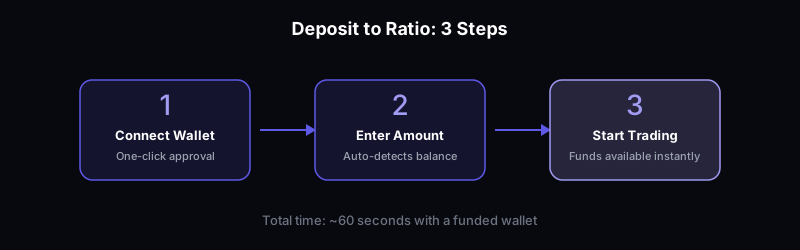
- Connect your wallet (click "Connect Wallet" and approve in MetaMask/Coinbase Wallet)
- Click "Deposit" or "Fund Account"
- Enter the amount of USDC
- Approve the transaction in your wallet
- Start trading
On Ratio, the deposit is one click. The platform detects your USDC balance automatically and handles the approval flow. No confusing contract addresses, no manual token approvals.
How Much Does It Cost? The Real Fee Breakdown
Let's talk actual numbers, because hidden fees are the silent killer of prediction market profits.
Getting USDC:
- Bank transfer to exchange: Usually free
- Debit card purchase: 1.5-3.5% fee
- Wire transfer: $10-25 flat fee (only worth it for larger amounts)
Moving USDC to Polygon:
- Exchange withdrawal to Polygon: Free to $2 depending on exchange
- Bridging from Ethereum: $1-5 depending on bridge and Ethereum gas prices
- Direct Polygon purchase: Already there, $0
Trading fees:
- Most prediction markets: 0-2% on trades
- Ratio: Competitive fees with no hidden spreads
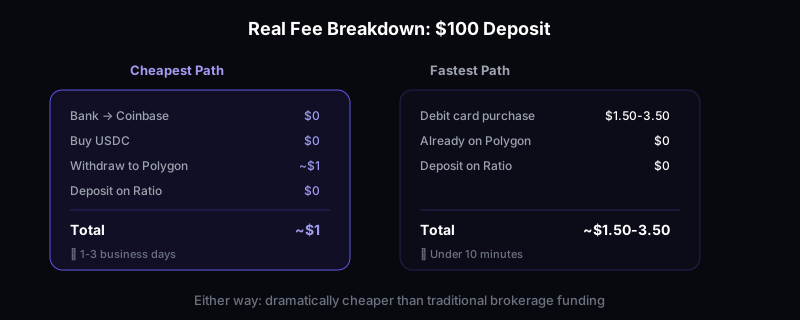
Total cost to go from $100 in your bank to $100 in a prediction market: Typically $1-5 if you use the exchange withdrawal method. Under $1 if you buy directly on Polygon.
The Cheapest Path (Step by Step)
For the cost-conscious trader, here's the optimal route:
- Open a Coinbase account (free, no trading fees on USDC)
- Deposit USD via bank transfer (free, takes 1-3 business days)
- Buy USDC (free on Coinbase — they don't charge for USD to USDC conversion)
- Withdraw USDC to your wallet on Polygon ($0-1 fee)
- Deposit on Ratio (free)
Total fees: approximately $0-1. You can't beat that.
The only downside is the bank transfer waiting period. If you want to trade right now (say, oil markets are moving because of Strait of Hormuz news), use a debit card purchase and accept the 1.5% fee. Speed has value when markets are volatile.
Common Mistakes That Cost Real Money
Sending to the Wrong Network
This is the number one way people lose money in crypto. If you send USDC on Ethereum to a Polygon address, or vice versa — it might be recoverable, or it might not. Always double-check the network before confirming.
The rule: Match the network. If the platform wants Polygon USDC, send Polygon USDC.
Forgetting Gas Money
On Polygon, gas fees are fractions of a cent. But you still need a tiny amount of MATIC to pay them. If your wallet has USDC but zero MATIC, you can't do anything. Most funded wallets solve this with automatic gas, but keep $1 worth of MATIC around just in case.
Not Keeping Withdrawal Gas
Don't deposit 100% of your USDC. Keep a small buffer ($2-5) for withdrawal gas later. Nothing is worse than being up 40% and unable to withdraw because you can't pay the $0.003 transaction fee.
Using the Wrong USDC
There are multiple versions of USDC. You want USDC (PoS) on Polygon, which is the bridged version from Ethereum. Some platforms also accept USDC.e or native USDC. Check your platform's documentation if you're unsure. Ratio accepts the standard USDC on Polygon — no confusion.
Security: Protecting Your Prediction Market Funds
Your prediction market bankroll is real money. Treat it like real money.
Essential security:
- Use a hardware wallet (Ledger, Trezor) for amounts over $500
- Enable 2FA on every exchange account
- Never share your recovery phrase with anyone
- Bookmark your platform URLs — don't click links from emails or DMs
- Verify contract addresses before approving transactions
For casual traders ($50-500): A hot wallet like MetaMask with a strong password is fine. Just don't keep your life savings in it.
For serious traders ($500+): Use a hardware wallet. The $80 cost of a Ledger is insurance against getting phished.
What About Non-Crypto Funding Options?
The landscape is changing. Some prediction markets now accept:
- Apple Pay / Google Pay through integrated on-ramps
- Bank transfers directly (no crypto step)
- Credit cards (higher fees, 3-5%)
Ratio is actively expanding funding options to make onboarding as frictionless as possible. The goal is to get you from "I want to trade" to "I'm trading" in under five minutes, regardless of whether you've ever touched crypto.
Check the platform's current funding options when you sign up — this space moves fast.
Quick Start Checklist
Here's your action plan:
- [ ] Install MetaMask or Coinbase Wallet
- [ ] Write down and safely store your recovery phrase
- [ ] Buy USDC (Coinbase for cheapest, debit card for fastest)
- [ ] Withdraw or bridge to Polygon network
- [ ] Keep $2-5 MATIC for gas fees
- [ ] Connect wallet to Ratio
- [ ] Deposit USDC
- [ ] Start trading
The whole process takes 15-30 minutes the first time. After that, adding funds takes about 60 seconds.
The Bottom Line
Funding a prediction market account with crypto sounds intimidating if you haven't done it before. But it's genuinely a 15-minute process, the fees are lower than traditional finance, and once you're set up, adding more funds is instant.
The crypto infrastructure isn't a bug — it's a feature. It means lower fees, faster settlement, real ownership of your money, and access to prediction markets from anywhere in the world.
Get your wallet set up, grab some USDC, and head to Ratio. Markets like Iran escalation odds, NCAA brackets, and oil prices are moving right now. The hardest part isn't the trading — it's the 15 minutes of setup you're about to finish.
Get Started
Ready to start copy trading?
Download Ratio and follow the best traders on Polymarket. Available on iOS and Android.